
RCC launches AI translation of masses in St. Peter's Basilica in Vatican
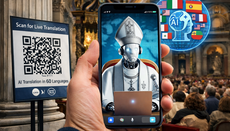
The Vatican is implementing an AI system in St. Peter's Basilica to translate masses into 60 languages in real time; access to the service will be through a QR code without an application.
On February 17, 2026, it became known that St. Peter's Basilica will begin using an artificial intelligence system to translate liturgical services into 60 languages in real time. This is reported by Euronews.
The new service will allow believers to follow the course of the liturgy on their smartphones. The technology's debut is planned for the upcoming celebrations dedicated to the 400th anniversary of the consecration of Saint Peter's Cathedral (1626–2026). Access to translation will be provided through a QR code at the entrance to the Vatican: after scanning, users will be able to receive audio and text translation directly in their browser without installing an application.
As noted by the archpriest of the basilica and vicar general of the Vatican, the initiative is designed to help pilgrims of different nationalities better understand the words of the liturgy. According to him, in this way the Church seeks to emphasize its universality and openness to believers from around the world.
The developers claim that special attention was paid to translation accuracy and reducing possible errors when creating the tool. At the same time, the Vatican emphasizes that while implementing modern technologies, the Church maintains caution.
Earlier, the UOJ wrote that a new AI-centred “religion” is emerging in the world.